
Download CleanMem – free RAM cleaner, Windows memory management, automatic cleanup, system performance boost, optimize RAM usage
Overview
CleanMem — это лёгкое приложение для Windows, разработанное для повышения производительности системы за счёт автоматического управления использованием ОЗУ. Его основная цель — освобождать память каждые 30 минут, помогая пользователям поддерживать постоянную отзывчивость, особенно при работе с несколькими приложениями или на старом оборудовании. Приложение ориентировано на тех, кто ищет простое решение для снижения задержек системы и повышения общей эффективности без необходимости технических знаний.
Хотя разработчик не предоставил дополнительной информации, CleanMem выглядит как специализированный утилитный инструмент, построенный для надёжности и минимального потребления ресурсов. Он работает как запланированная задача, устраняя необходимость в традиционном интерфейсе или постоянном взаимодействии с пользователем. Это делает его идеальным для тех, кто предпочитает подход «установил‑забыл» к обслуживанию системы.
Практические сценарии использования включают пользователей, работающих с программным обеспечением, требующим большого объёма памяти, таким как видеоредакторы, разработчики или многозадачные пользователи, открывающие несколько вкладок браузера и приложений одновременно. В таких ситуациях CleanMem помогает предотвратить замедления, периодически очищая неиспользуемую ОЗУ и обеспечивая более плавную работу. Его роль в экосистеме Windows значительна для тех, кто полагается на стабильность системы, но не имеет времени или знаний для ручного управления настройками производительности.
Несмотря на простоту, CleanMem решает распространённую проблему — «раздутие» памяти. Предоставляя постоянную автоматическую очистку, он способствует более предсказуемому опыту работы, особенно на системах с ограниченным объёмом ОЗУ.
Key Features & Functionality
- Automated RAM Cleanup: CleanMem performs a background cleanup of unused memory every 30 minutes, ensuring that RAM remains available for active processes. This scheduled task runs without user input, reducing the need for manual intervention.
- Minimal Processing Time: The cleanup process takes only five seconds, minimizing impact on system performance. Users experience no noticeable lag during execution, making it suitable for continuous background operation.
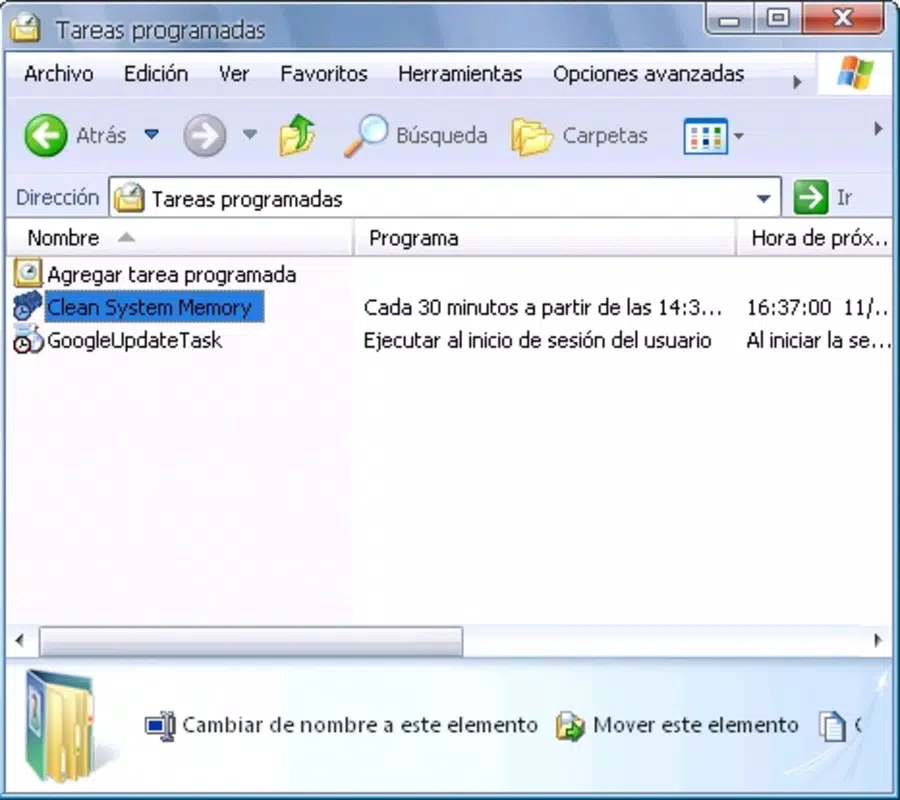
- No User Interface: Unlike most system tools, CleanMem does not include a graphical interface. Instead, it integrates as a scheduled task, appealing to users who value simplicity and efficiency over visual controls.
- System Performance Optimization: By freeing up idle RAM, the tool helps reduce system lag, improve application responsiveness, and maintain smooth multitasking performance over extended periods.
- Windows-Specific Design: CleanMem is built exclusively for Windows operating systems, ensuring compatibility and optimized functionality across supported versions without unnecessary overhead.
For example, a user running a web browser with 50 tabs, a code editor, and a virtual machine would benefit from CleanMem’s periodic memory refresh. Without it, such a setup could lead to sluggish performance. With CleanMem, the system remains responsive due to regular memory optimization.
Interface, UX & Performance
CleanMem does not feature a traditional user interface, which influences its overall user experience. Instead, it operates silently in the background as a scheduled task, relying on system integration rather than direct user interaction. This design choice prioritizes efficiency and minimalism over visual feedback or customization.
The lack of a UI means users cannot monitor the cleanup process or adjust timing settings through a dashboard. However, the trade-off is a streamlined experience with zero distractions. Navigation is not applicable, as there are no menus, buttons, or settings screens to navigate.
Performance-wise, the application is highly efficient. It completes its task in just five seconds, consuming negligible system resources during execution. Although the developer did not list formal performance metrics, the minimal footprint suggests stable operation across a range of Windows devices, including those with older hardware.
Responsiveness is maintained during cleanup, with no noticeable interruptions to active tasks. Stability is implied by its long-standing presence in the system tools category, though no official reports on crashes or errors were provided. Overall, the UX is functional for its intended audience—users who prioritize results over control.
Platform Compatibility & Technical Requirements
CleanMem is designed for the Windows platform and is compatible with Windows operating systems. The current version is 1.2.1, and the application file size is 1.2 MB, indicating a lightweight footprint.
The developer did not specify minimum OS requirements or version compatibility details. Therefore, users should verify compatibility with their specific Windows version before installation. No additional software dependencies were listed.
As a standalone executable, CleanMem does not require installation of external frameworks or runtime libraries. Its small size and minimal system impact make it suitable for deployment on older systems or devices with limited storage capacity.
Pros and Cons
Pros
- Automatic RAM cleanup every 30 minutes with no user input required
- Extremely fast processing time—only five seconds per cleanup
- Minimal system resource usage during operation
- Designed for Windows with no unnecessary overhead
- Free to download and use without ads or in-app purchases
Cons
- No graphical user interface for monitoring or configuration
- Fixed cleanup interval—users cannot adjust the frequency
- Developer did not provide detailed compatibility or system requirements
- Limited customization options due to minimalistic design
- Users cannot manually trigger cleanup or view logs
FAQ
Is CleanMem safe to use on my Windows PC?
CleanMem is designed as a system utility with no known malicious components. It operates by releasing unused RAM, a standard and safe function. However, users should download it only from trusted sources to ensure integrity.
Can I manually trigger a RAM cleanup?
No, the app does not provide a manual trigger. Cleanup occurs automatically every 30 minutes based on a scheduled task. There is no built-in option to initiate the process on demand.
Does CleanMem work on all Windows versions?
The developer did not specify which Windows versions are supported. It is recommended to test compatibility on your system before use, especially if running an older or less common edition of Windows.
Is CleanMem free to download and use?
Yes, CleanMem is available at no cost. There are no in-app purchases, subscriptions, or advertisements. It is a free tool intended for personal and professional use.
How often does CleanMem clean the RAM?
CleanMem performs a RAM cleanup every 30 minutes. This interval is fixed and cannot be modified through the application, as it lacks a user interface for settings.
Final Thoughts
CleanMem offers a focused, no-nonsense solution for users struggling with system slowdowns caused by memory bloat. Its automated, low-impact cleanup process delivers tangible performance benefits without consuming resources or disrupting workflow. While the lack of a user interface and customization options may limit appeal for advanced users, it is ideal for those who value simplicity and reliability.
For individuals using older systems or running multiple applications simultaneously, CleanMem provides a consistent performance boost with minimal effort. Its free status and small size make it accessible to a wide audience. If you’re seeking a secure, efficient way to optimize RAM usage on Windows, this tool delivers on its promise.
Download CleanMem now


